Grocery Market Cashier Store
NutBolt GamesEducational
3.4405.00 Reviews
- Version
- 4.8
- Installs
- 10.00M
- Age Rating
- Everyone
Screenshots

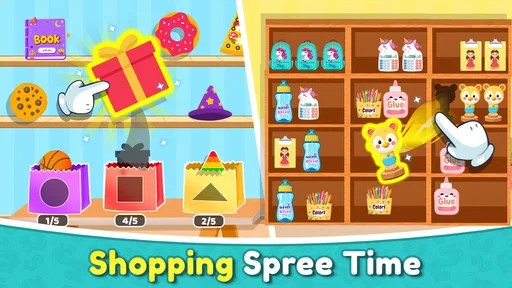

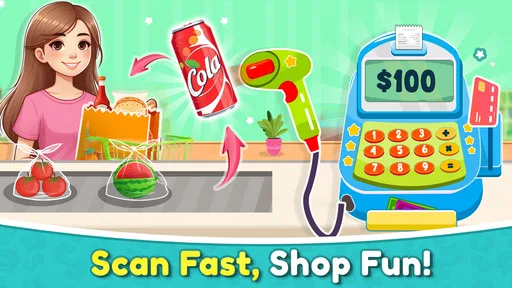

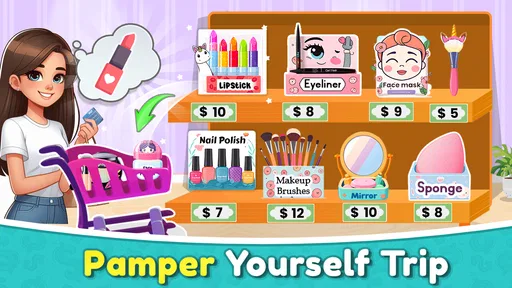
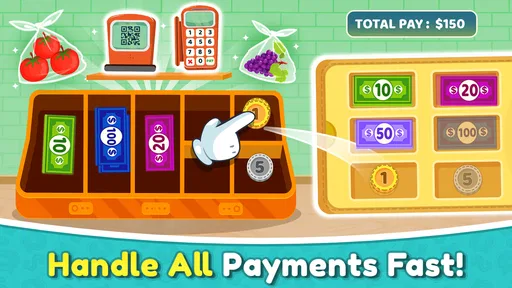

Our Review of Grocery Market Cashier Store
 Analysis by Appyee
Grocery Market Cashier Store is the kind of educational game I would hand to someone who wants a simple introduction to checkout work without turning the experience into a serious simulation. I spent time with it as a casual cashier exercise, and its central idea is easy to understand: you operate a cash register while serving customers in a grocery-market setting. That focus makes it approachable, especially for younger players, but it also means the game is narrower than a full shop-management or business simulator.
Created by NutBolt Games, this free game sits in the educational category and is suitable for Everyone. It has reached more than ten million installs, which tells me that its basic concept has found a broad audience. The average rating is 3.4 from roughly nine thousand ratings, so I would not approach it expecting a flawless, deeply developed simulation. I see it instead as a lightweight practice game with a clear learning angle and a low barrier to entry.
How the cashier experience feels today
The appeal is immediate because the task is familiar. A player can look at the register, deal with a purchase, and work through the basic logic of handling a customer’s transaction. That makes the game more understandable than many educational titles that bury the lesson under menus, explanations, or complicated rules.
What I like most is that the activity gives children a practical context for numbers. Counting money can feel abstract on a worksheet, while a checkout scene gives the calculation a reason. Even when the play is simple, the player is encouraged to connect a total with the amount received and the change that should be returned. That connection is useful for early learners who need repetition before arithmetic becomes comfortable.
The game also works as a short, supervised activity. I would not expect a child to spend a long afternoon with it in the same way they might with a creative building game. A better use is a few rounds followed by a real-world question: how would you check the money, what happens if the customer gives a different amount, and why should the change be counted back? The app gives the situation; an adult can turn it into a fuller lesson.
Its simple presentation is both a strength and a limitation. A first-time player can understand the premise quickly, but anyone looking for a rich store environment, detailed stock management, staff decisions, or an evolving business will probably find the experience too narrow. The title points toward a cashier role, not toward running an entire supermarket, and that distinction matters before downloading it.
A practical way to use it at home
One realistic scenario is a child preparing to handle small purchases independently. I would let the child play a few checkout rounds, then pause before the answer appears and ask them to estimate the change. Afterward, I would use coins or paper notes at home to recreate the same transaction. This two-step routine is more valuable than simply tapping through the game because it transfers the digital exercise into a physical habit.
Another useful approach is to make the player explain each step aloud. Instead of asking only whether the answer is right, ask: what was the total, how much did the customer give, and how did you decide what to return? That exposes whether the player understands the process or is merely reacting to the on-screen prompts. In my view, this is one of the better ways to get educational value from a basic cashier game.
I would also use it for short practice sessions rather than rewards based purely on speed. Fast tapping can look successful while hiding careless counting. Encouraging accuracy first, then gradually asking for smoother work, creates a better learning sequence. The game is most helpful when the person using it treats the register as a reasoning exercise instead of an arcade challenge.
What the current version suggests about its development
The current version is 4.8, and the game was released on August 14, 2018. That combination suggests a product that has continued through multiple revisions rather than remaining at its original launch build. I see the version history as evidence of ongoing maintenance, but I would not treat the number alone as proof of a major redesign. A later version can contain adjustments that are important for compatibility or stability without changing the central play experience.
For someone already familiar with the game, the meaningful question is whether the present build still delivers the same straightforward cashier lesson without adding unnecessary complexity. From my experience, the core identity remains clear. It is still a focused register activity, not a new genre disguised under an old name. That consistency is useful for families who want a predictable learning tool, although players hoping for a dramatic expansion may be disappointed.
The minimum operating-system requirement is Android 8.0, so the game is aimed at devices that are not extremely old but are still common in family use. I would check the software version before planning to install it on an older hand-me-down phone or tablet. On a compatible device, the low-cost entry point is attractive: the game is free, which makes trying it less of a commitment than buying a dedicated educational title.
NutBolt Games has chosen a subject that can remain understandable over time. The fundamentals of a checkout transaction do not need a complicated story or a constantly changing world. That gives the game a stable educational purpose. At the same time, a stable concept places more pressure on the details: clear feedback, readable controls, fair pacing, and enough variation to prevent every session from feeling identical.
What existing users gain from the updates
For an existing player, the biggest benefit of a maintained build is confidence that the app remains usable on supported Android devices. That matters more than a flashy feature when the audience includes children, parents, or teachers who want to open the game and begin without a long setup process.
The later version also makes the game easier to recommend as a current option rather than an abandoned old download. I would still judge it by the actual learning experience, but continued versioning is a positive sign for people who already enjoy the cashier format. If a child has learned the basic routine in an earlier build, the familiar structure should make returning less intimidating.
There is a trade-off here. Familiarity helps learning because the player can concentrate on the transaction instead of relearning the interface. However, familiarity can also reduce challenge once the process becomes automatic. In that situation, I would not assume that repeating the same activity indefinitely will produce more progress. I would add spoken questions, real coins, or slightly harder examples outside the app to keep the practice meaningful.
The public response is mixed rather than universally enthusiastic. A 3.4 average from about 9.1K ratings indicates that many people find enough value to engage with it, while others see shortcomings. I think that balance matches the product: the idea is useful and accessible, but the experience is not ambitious enough to satisfy every player. Its broad install base should not be confused with a guarantee that it fits every learning style.
Where it compares well with alternatives
Compared with a worksheet, the game has one clear advantage: it gives arithmetic a role in a recognizable situation. A child who dislikes abstract sums may respond better when the numbers are connected to a customer and a register. The visual context can make the exercise feel less like homework, even if the underlying skill is still basic calculation.
Compared with a full retail simulator, this game is easier to start and less demanding. A business-management game may include inventory, pricing, staff, store layout, and long-term decisions, but those systems can distract from the specific skill of handling a transaction. If the goal is to practice the cashier’s basic responsibilities, the narrower design is more direct.
Compared with a dedicated math-learning app, the cashier setting is more concrete but may be less comprehensive. A structured math program is usually the better choice when a learner needs a planned progression across addition, subtraction, multiplication, or assessment. I would choose this game when the learner benefits from context and role-play, not when I need a complete curriculum.
It also differs from pretend-play grocery games. Those titles may emphasize shopping, storytelling, or arranging products, while this one puts the register at the center. That makes it a better match for someone curious about the checkout role, but a weaker choice for a child who mainly wants open-ended supermarket play.
Small techniques that make the game more useful
My first tip is to separate recognition from calculation. Let the player identify the purchase total before touching the register. If they immediately tap through the interface, it becomes difficult to tell whether they understood the amount or simply followed the next visual cue. A short pause turns the same round into a better test of attention.
My second tip is to count change upward rather than only subtracting. For example, if the total is a small amount and the customer gives a larger note, the player can start at the purchase total and count until reaching the amount received. This mirrors how people often check change in real shops and gives children another route when subtraction feels difficult.
My third tip is to use the game as a conversation starter about mistakes. If the player gets a transaction wrong, I would ask them to find the exact step that caused the problem instead of simply retrying. Was the total misread? Was the amount received forgotten? Was the returned money counted incorrectly? This turns an error into a diagnostic moment, which is more valuable than chasing a perfect score.
A fourth useful trade-off is screen time versus real practice. The app can repeat a scenario conveniently, but physical money adds weight, shape, and the need to organize denominations. I would alternate between the two. The digital register is good for quick repetition; real objects are better for building a practical sense of handling cash.
Limits that should shape your expectations
The most important limitation is scope. This is not the right choice for someone who wants a realistic employment simulator or a complete grocery-store management game. The cashier activity is the point, and players who need inventory decisions, supplier planning, customer-service stories, or business strategy should look elsewhere.
The educational value also depends on the learner’s age and starting level. A beginner may benefit from the concrete setting, while an older student who already handles money confidently may find the tasks too easy. I would especially avoid presenting it as a replacement for formal instruction. It can reinforce a narrow skill, but it does not cover every part of financial literacy or workplace training.
Another limitation is that a game built around a familiar routine can become repetitive. Repetition is helpful when the learner is still building confidence, but it loses value when every transaction feels automatic. Parents and teachers should watch for that point and change the activity rather than assuming more rounds equal more learning.
The rating of 3.4 is worth considering before recommending it widely. It does not make the game unusable, but it does suggest that the experience has rough edges for part of its audience. I would test it personally before installing it on a child’s main learning device, especially if that child is sensitive to confusing controls or needs a very polished educational interface.
Who should try it, and who should skip it
I would recommend Grocery Market Cashier Store to a young learner who enjoys role-play, needs gentle practice with transaction logic, or is curious about what happens at a supermarket checkout. It is also a reasonable free option for a parent who wants a short activity to support conversations about totals and change.
It can work for teachers as a supplementary prompt, particularly when a lesson already includes shopping, money, or everyday arithmetic. I would use it in a limited station or demonstration rather than making it the entire lesson. The game gives students a common scenario, while the teacher supplies the explanation, correction, and progression.
I would skip it if you want a deep simulation, a broad math course, or a highly varied long-term game. I would also choose a different option for learners who need accessibility features or a carefully sequenced academic program unless the app has been tested successfully with that individual. The free price removes a financial barrier, but it does not remove the need to match the tool to the learner.
What I would watch in future development
If NutBolt Games continues updating the title, I would be most interested in improvements that deepen learning without losing the simple register focus. Clearer explanations after an error would be more valuable to me than decorative additions. A player should understand why an answer is wrong, not merely be told to try again.
I would also welcome carefully introduced progression. Beginners could start with easy transactions, while confident players could face more varied totals or have to verify each stage independently. The important balance would be keeping the task understandable for children while giving returning users a reason to think rather than tap from memory.
Another area worth watching is the relationship between speed and accuracy. A good cashier exercise should reward careful work before it rewards quick work. If future changes emphasize timers too heavily, the educational purpose could weaken. If they provide optional challenges, however, experienced players could gain variety without making the basic mode stressful.
I would not expect every update to transform the game. The strongest future direction is probably refinement: smoother interaction, clearer feedback, and more useful variation around the same central lesson. That would preserve what makes the app approachable while addressing the main reason a learner might outgrow it.
My final recommendation
After using it, I see Grocery Market Cashier Store as a modest but understandable educational game rather than a complete retail simulation. Its best quality is focus: it gives a child a familiar checkout situation and a reason to think about money. Its weakest quality is the same focus, because the experience may feel limited once the basic routine becomes easy.
The fact that it is free and rated for Everyone makes it simple to test, and its support for Android 8.0 or later covers many compatible devices. I would introduce it with a specific goal, such as practicing change or explaining the steps of a transaction, instead of leaving it to provide unlimited entertainment on its own.
My honest verdict is that this is worth trying as a short, guided money-learning activity, not as a full-length game or replacement for structured math practice. If that matches what you need, the cashier setting is clear enough to be useful. If you want depth, variety, or a complete supermarket world, I would choose a more advanced alternative and keep this one only as a simple supplementary exercise.
Verdict
Strengths of Grocery Market Cashier Store
- Simple controls make it easy for younger players to pick up.
- Short shopping tasks are suitable for quick play sessions.
- Cashier activities introduce basic counting and money-handling concepts.
- Bright visuals and playful animations keep the store entertaining.
- Offline play allows access without a constant internet connection.
Limitations of Grocery Market Cashier Store
- Gameplay can become repetitive after completing the same store tasks.
- Some features or items may be limited without in-app purchases.
- Ads may interrupt play, depending on the device and app version.
- The educational value is basic and does not replace real-world practice.
- Performance may vary on older phones or tablets.
Similar Picks in This Category
View All
Little Panda Policeman
BabyBus4.0

Monster Trucks Game for Kids 2
Raz Games4.1

Little Panda's Chinese Recipes
BabyBus4.4

Little Panda's Restaurant
BabyBus4.4

Little Panda's Ice Cream Games
BabyBus4.3

Baby Panda Care
BabyBus3.8
Frequently Asked Questions
What is Grocery Market Cashier Store about?
Grocery Market Cashier Store is a casual simulation game in which you manage a supermarket checkout and take care of everyday store activities. Players scan products, calculate totals, accept payments, give change, and help customers complete their shopping. Depending on the version, the game may also include stocking shelves, organizing products, improving the store, and unlocking additional tasks as progress is made.
How do you play Grocery Market Cashier Store?
The main gameplay is designed to be simple and accessible. Customers bring items to the checkout, and you identify or scan each product before adding it to the bill. You then select the correct payment method, collect the money, and return the proper change when necessary. Some levels add time limits, customer satisfaction goals, or extra supermarket-management activities.
Is Grocery Market Cashier Store suitable for children?
The game is generally suitable for children and casual players because it uses straightforward controls, colorful visuals, and familiar supermarket situations. It can also help younger users practice basic counting, recognizing products, and handling simple transactions. Parents should still check the current store listing for advertising, in-app purchases, privacy information, and age recommendations before allowing a child to play.
Does Grocery Market Cashier Store require an internet connection?
An internet connection may not be necessary for the basic cashier gameplay, allowing players to enjoy many activities offline after installation. However, online access can still be requested for advertisements, analytics, updates, cloud features, or purchases. Because requirements may differ between Android and iOS versions, it is best to review the official app-store description and test the game with mobile data disabled.
Is Grocery Market Cashier Store free to download and play?
Grocery Market Cashier Store is typically offered as a free download, but the exact business model can vary by platform and publisher. Free versions may contain advertising, optional in-app purchases, or paid items that unlock content or remove interruptions. Before downloading, check the official listing for the latest pricing details, permissions, subscription information, and whether any purchases are protected by your device’s parental controls.
Play our best games!


